
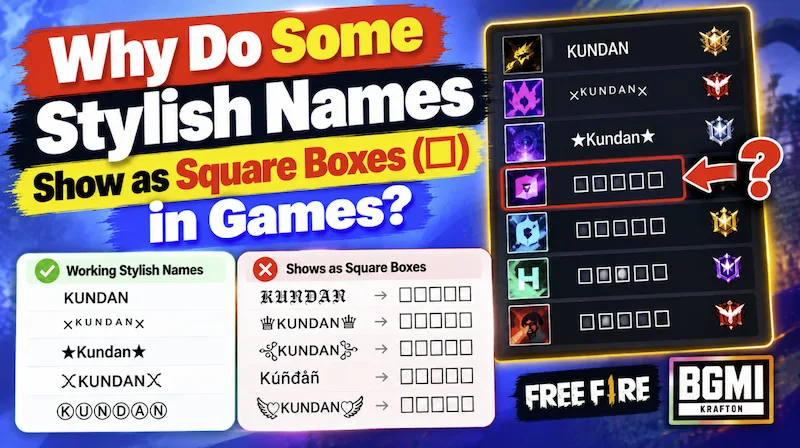
If you ever played online games with your friends and classmates, you know how much your gaming name is important. And Nothing ruins the excitement of getting a new Rename Card faster than this: you copy an awesome, royal-looking nickname from a browser, paste it into Free Fire, BGMI, PUBG Mobile, or Call of Duty Mobile, and instead of cool gaming name, you see a row of ugly rectangle boxes (☐☐☐☐), crossed-out squares, or question marks inside diamonds ().
Even worse, sometimes a stylish name looks completely normal on your own phone keyboard while typing, but once you save it, your teammates tell you that your name looks like broken boxes on their screens. Here is the exact technical reason why this happens—and how to make sure you only choose 100% game-safe fonts.
What Are Those Square Boxes (☐)? Meet the “Tofu” Character
In computer typography, that blank vertical rectangle (☐) has an actual nickname among software engineers: it is called “Tofu” because it looks like a little white block of bean curd.
Your mobile phone’s web browser (like Chrome or Safari) uses massive system font packs installed by Google and Apple that support over 100,000 global Unicode symbols. That is why every single font on StylishName.org looks crisp and clear while you are browsing our website.
However, mobile games like BGMI and Free Fire want to keep their download size small and their frame rates (FPS) high. Instead of loading your phone’s entire 100,000-character dictionary, the game engine bundles its own smaller internal font file. When you paste a Unicode symbol that is missing from the game’s internal font dictionary, the game engine panics and draws a ☐ square box in its place.
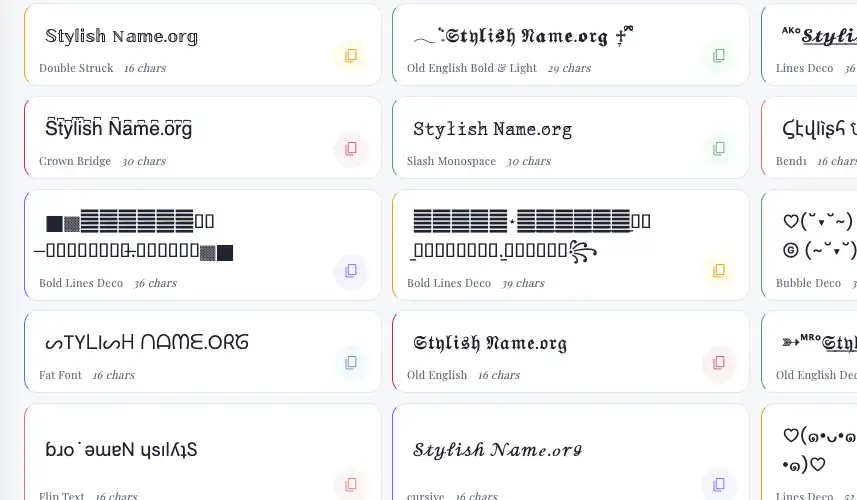
Do square boxes only appear in online games?
You might think that these square boxes, also known as tofu characters, only appear in online games like Free Fire, PUBG, and Call of Duty. Then you are wrong, Basically in online games they use limited font collections to save resources, so some special characters may not display correctly in your username or nickname.
However, this problem is not limited to games. You might also see square boxes on your mobile phone, laptop, PC, or website. This usually happens when a font, device, or application cannot display a particular character correctly.
So, how can you check whether a character is supported?
If you see a square box in our stylish name generator, copy the character and paste it into your browser’s address bar or another text field. and If it still appears as a square box, your current system or font might not support it. If the actual symbol appears correctly, your device can display it, even if the original website or application cannot.
Keep in mind that this test is not completely reliable because different applications use different fonts and rendering systems. A character that displays correctly in your browser might still appear as a square box in a game.
Most symbols, emojis, and fancy text generated by our tool work on many websites and applications. However, not every character is supported on every platform or in every game. Online games may have additional font limitations or restrictions on special characters.
Therefore, before using fancy text or special symbols in your gaming nickname, test them in the game you play. This will help you find characters that display correctly on your device and are supported by the game.
Which Fonts Work in Games vs. Which Fonts Turn Into Boxes?
To avoid wasting a Rename Card, you need to know which Unicode character blocks are included inside mobile game engines and which ones are only meant for social media apps like Instagram and WhatsApp. Use this tested cheat sheet before copying your name:
| Font Style Category | Example Preview | Free Fire / FF Max | BGMI / PUBG | Instagram / Discord |
|---|---|---|---|---|
| Small Caps | ꜱᴛʏʟɪꜱʜ ʙᴏʏ | ✔ Works 100% | ✔ Works 100% | ✔ Works 100% |
| Superscript Tags | ᴮᴼˢˢ / ᴹᴿ° / ᵞᵀ | ✔ Works 100% | ✔ Works 100% | ✔ Works 100% |
| Cyrillic & Cherokee | АLОИЕ / ᏟᎡᎪᏃY | ✔ Works 100% | ✔ Works 100% | ✔ Works 100% |
| Asian Clan Symbols | 亗 / ࿐ / ×͜× / ツ | ✔ Works 100% | ✔ Works 100% | ✔ Works 100% |
| Old English (Fraktur) | 𝔖𝔱𝔶𝔩𝔦𝔰𝔥 𝕹𝖆𝖒𝖊 | ✔ Mostly Works | ✘ Shows ☐ Box | ✔ Works 100% |
| Mathematical Cursive | 𝓢𝓽𝔂𝓵𝓲𝓼𝓱 𝓝𝓪𝓶𝓮 | ✘ Shows ☐ Box | ✘ Shows ☐ Box | ✔ Works 100% |
| Colored / Square Emoji | 🆂🆃🆈🅻🅸🆂🅷 | ✘ Blocked | ✘ Blocked | ✔ Works 100% |
4 Simple Steps to Test Any Stylish Name Before Saving It
Never press the final “Confirm” button on your Rename Card until you run this quick 30-second test inside the game:
- Use Our Game-Safe Filters First: On the StylishName.org Generator, click the Free Fire, Small, Bend, or Gamer filter tabs. These presets are specially built using phonetic and Cyrillic letters that games natively support.
- Test in the In-Game World Chat or Clan Chat: Before opening your Rename Card, paste your copied nickname into the game’s Guild Chat, Clan Chat, or World Chat and send it.
- Look at the Sent Message (Not the Keyboard Preview!): While the text is still inside your phone’s typing bar, it uses your phone’s font. Once you press send and it appears inside the actual game window, it uses the game’s font. If any letter turns into a ☐ in the chat window, it will also turn into a box in your profile!
- Swap Out Broken Letters: If only one letter in your name shows up as a box (for example, the letter “Q” or “Z” in certain styles), replace just that single letter with a Small Cap or standard capital letter.
Frequently Asked Questions (FAQ)
1. Why does my stylish name look fine on my iPhone, but looks like boxes on my friend’s Android?
Apple (iOS) and Google (Android) update their Unicode libraries on different schedules. If you use a brand-new symbol added in a recent iOS update, a friend playing on an older Android 10 or Android 11 phone may not have that symbol in their system files yet. Sticking to classic symbols like ꧁꧂, 亗, ࿐, and Small Caps ensures your name looks identical on every device.
2. Why does BGMI block more fonts than Free Fire?
BGMI (and PUBG Mobile) uses a strict whitelist validation system for nicknames. It primarily accepts Latin, Cyrillic, Korean, Japanese Katakana, and selected phonetic characters. Free Fire has a much wider Unicode allowance, which is why decorative brackets like ༺༻ and ☬ are far more common in Free Fire lobbies.
3. Can I download an app to fix square boxes in my game?
No. Beware of any third-party app or APK claiming to “unlock hidden fonts” inside Free Fire or BGMI—modifying internal game font files violates anti-cheat rules and can get your account banned. Always use native Unicode copy-and-paste characters from a trusted web generator instead.